Most couples want to avoid tension, arguments, and—of course–breaking up. One way to do that, it seems, is to talk about money.
Whether you’re married, engaged, or just starting to get serious with somebody, it’s a good idea to come clean about your financial situation, learn to share your financial goals, and start talking about your financial habits.
Although I’m a financial blogger, I’m not perfect. I still splurge sometimes. I have old accounts I need to take care of. I’m human. But one thing I am good at—if I do say so myself—is honest communication about finances with my wife, Lauren.
And by that I don’t just mean: “Hey Sweetie, have you paid the credit card bill this month?” I mean we’re good at talking about:
- How we’re doing with daily expenses compared to what we hope to spend in a month.
- Our financial priorities for the coming year.
- Our financial values and our long-term goals.
Our commitment to talking about money goes back quite a ways. For example, well before we got married, I told her:
“Hey, I’ve got $80,000 of debt; you MAY NOT want to marry me!”
Of course, I also told her:
“I have a plan to better my career, start a business, watch my expenses, and pay this off.”
And that’s what I did. (I think she made the right decision, and hopefully she agrees!)
This Valentine’s Day, let me show you how to treat your partner to a gift that may just transform your relationship…the gift of talking about money. Here are six strategies that over have worked well to help Lauren and I talk about money openly, honestly, and frequently.
6 ways to have better money talks
1. Agree to disagree
Men and women value money differently. But the more you talk about your values and differences with your partner, the less likely you’ll resent your loved one for a financial decision you may not understand.
For example, Lauren and I agree that a new car is in our future, but we don’t see eye to eye on how much to spend. She’s tempted by some sweet deals on brand new cars these days—including 0% financing with our good credit. I, too, would love a new car (and I am not necessarily opposed to them), but I’m wary of a three or four year car loan, even at 0% APR. (I just spend years getting out of debt, and I’m not eager to go back in…even though it’s under entirely different circumstances.) One of us is going to lose this debate, and that’s okay. The important thing is we discussed the pros and cons and we will end up making the decision together.
2. Don’t make it a big deal
Don’t wait until you’re upset about a big purchase your partner made to bring up finances. The best way to talk about money is a little bit every day. Money is a part of life; it’s not a big deal until it becomes a big deal. (And it becomes a big deal when you don’t talk about it and/or hide stuff.)
3. Focus on each other’s strengths
Remember how I said that even though I write about finances everyday, I’m not perfect? Well, here’s an example: I tend to get emotional about stuff I want. I’m human. And believe it or not, Lauren is better at making practical decisions about what to buy now and what to buy later. When I get impulsive, she slows me down.
That said, Lauren’s not the best at staying on top of routine financial matters like routine bill due dates or organizing tax records. So since we’ve gotten married, I’ve started making sure all our joint bills are paid and filing important paperwork. Quite simply, our finances are better off together than they would be apart, and not just because we split the mortgage and the groceries.
4. Don’t just talk numbers, talk values
This is huge. If you love fashion, finding a $400 coat at half price might not just be a justifiable expense, but a great deal!! But when you try to explain this to your partner who only shops at Goodwill, he or she might freak.
“But this designer coat was only $200,” you’ll say. “You went to Las Vegas and blew $1,500 last month!”
In this case, it’s not about the number.
Okay it is, but the number is only part of the story. It’s about what you value. If you want your partner to understand why you need that $200 coat was a good deal, you need to take time to explain why you value it—and your partner needs to take the time to understand.
5. Do. Not. Lie.
You may not equate buying a new jacket or betting $100 on the super bowl behind your partner’s back to cheating, but the damage you’re doing may be just as real. Financial infidelity is a real problem, with some studies estimating that between 25-35% of Americans admit to being guilty. The biggest thing you can do to make talking about money with your partner easier? Agree to always tell the truth.
6. Talk about earning money, not just spending it
I think we often focus too much on how we spend, save, and invest money and too little on how we earn our money. I also think that how we earn our money—our jobs, our businesses, our investments—shapes our overall relationship with money in a significant way.
For example, consider two people, Amy and Joe. Amy earns six figures at a demanding, stressful job that she doesn’t love. She can afford a nice home and new luxury car. Joe, on the other hand, runs his own business as a motorcycle mechanic. He works hard, to be sure, and earns enough money to meet his needs. Joe lives in a modest house and drives a used car he keeps running, but best of all he’s his own boss and he loves his work. He couldn’t imagine doing anything else.
If you were to ask Joe and Amy if they feel rich, they’d BOTH say yes, but for entirely different reasons.
Talking about how you want to earn money is a vital part of your money talk. If you someday want to work part-time, own your own business, or retire early so you don’t have to work at all—don’t you want to know how your partner feels about that? It’s also critical to discuss what things will look like in your relationship in these common scenarios:
- What if your partner earns significantly more?
- What if your partner loses his or her job and needs support?
- What if your partner goes back to school and needs support?
- What if you or your partner decides to become a stay-at-home parent when you have kids?
Smart couples will talk about these kind of scenarios before they’re right around the corner.
How to start talking
Bringing up money isn’t easy, especially in a new relationship (or in an established one, if you’ve never talked finances before). Here are a few ways to start:
Be casual
Mention that you’d like to talk about money before diving into hard-hitting questions. Feel out your partner’s response. Do use an argument over money as the opportunity to start talking about it.
Start slowly
Start with easier topics like your long-term financial goals and work towards more sensitive ones like debts, assets, and credit histories.
Be understanding
Talking about money can make us feel vulnerable, so you can build trust with your partner by being extremely understanding and supportive when talking about your finances. This is important because the absolute worst thing for your relationship is if he or she isn’t truthful about money. And remember, it may be disheartening to learn your loved one has a ton of debt or awful credit (or to reveal that about yourself), but it’s also not conducive to a healthy, trusting relationship to live with that information a secret.
THE COUPLE’S MONEY WORKSHEET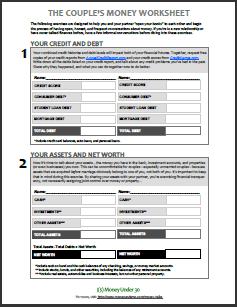 When you’re ready to get serious about money talk with your sweetie, here’s a worksheet that will get you started.
(Note: This isn’t the tool to use if you you’ve never talked about money before. In other words, don’t slide this to somebody you just met…it’s akin to asking his or her to complete a credit app in order to date you).
This worksheet is ideal for couples who are married, engaged, or living together. (If you’re serious enough to share monthly expenses, you’re serious enough to share your finances.) It will guide you through conversations about your credit histories, debts and assets, financial values, and long-term financial priorities.
